Daily Affirmations
Focus on less,
accomplish more.
SKILLS
AI Workflow, Wireframing, Prototyping, User Testing, Analysis, Full-Stack Thinking
TOOLS
Claude, Figma, FigmaMake, Supabase, Surveys
TIMELINE
1 week
TEAM
Solo
opportunity space
It’s 2026 and nearly everyone has access to an endless stream of ideas and opportunities constantly competing for their attention.
Morning Pages––a daily "brain dump" journaling practice meant to reduce stress, improve focus, and overcome creative blocks––helped me start each day with intention and provided a window to connect with my thoughts, but the commitment of writing three-pages daily proved unsustainable.
When I revisited an old entry a month later, I discovered goals I'd completely forgotten but still deeply cared about, buried under everyday noise.

the challenge
The challenge is choosing which ideas & opportunities deserve our sustained focus, and protecting that commitment when new, equally compelling ones emerge.
I needed a quick way to anchor myself in what I really cared to be putting my energy and focus towards––ensuring my efforts day to day stay in alignment with the life I want to be living.
inspiration
Leveraging the psychology of affirmations
Affirmation
A positive statement you repeat regularly to yourself – aloud or silently – to build confidence, challenge negative thoughts, and focus on what you want to achieve.
“I make time for the
things and people that nourish me.”
“I’m building a life
I’m obsessed with.”
“I release perfection and
embrace progress.”
“I invest in myself
because I am worth it.”
“I attract the right people by being myself.”
“I choose curiosity
over criticism.”
How might we use affirmations to help users stay committed to, and ultimately actualize, their most meaningful values and desires?
concept
Users define a small set of affirmations — goals or beliefs they want to achieve or embody — then actively engage with them word for word each day, until those affirmations become reality.
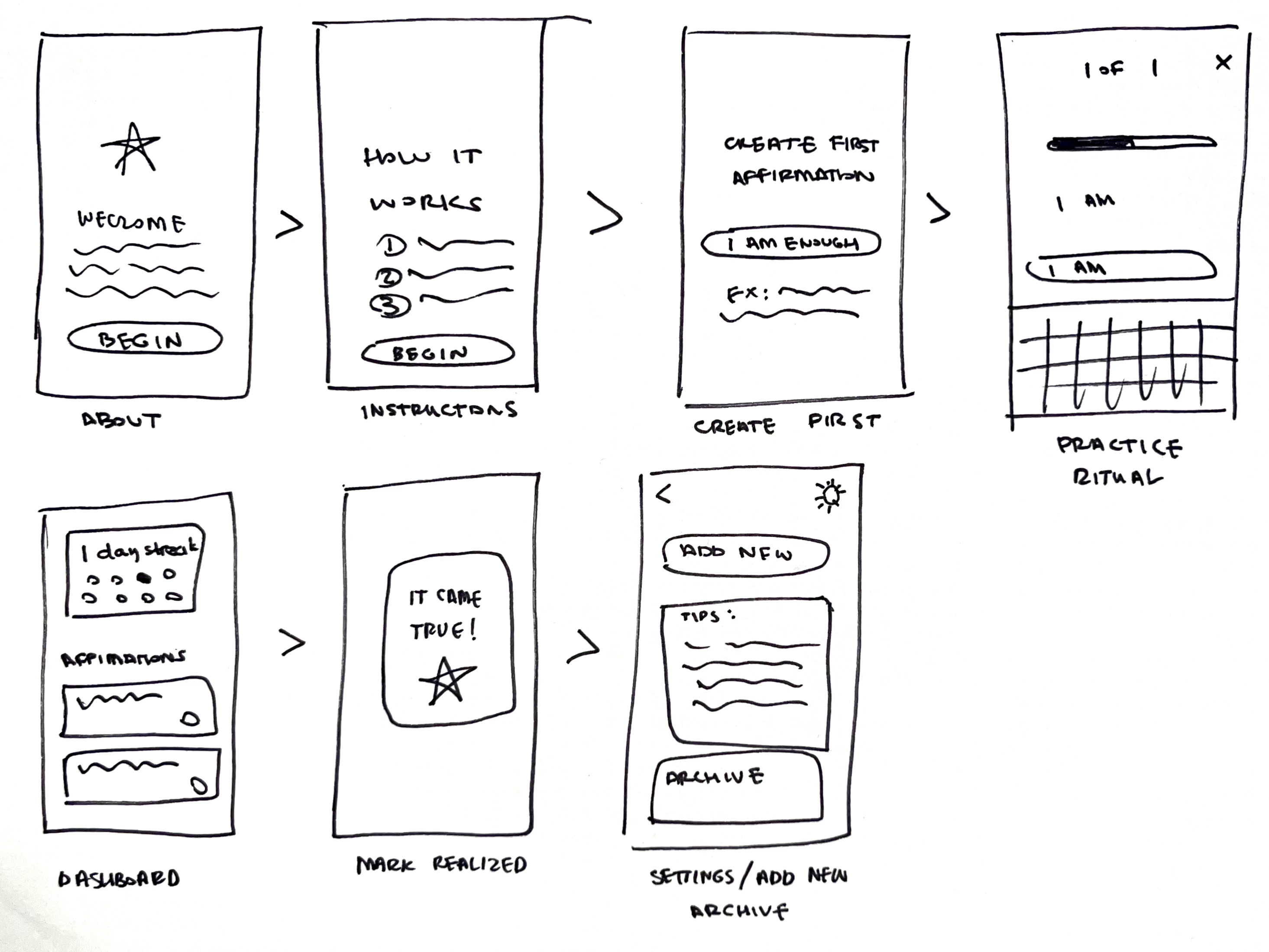
After several rounds of hand sketching possible ways users could practice their affirmations, I chose a user flow and three interactions to bring to life for testing:
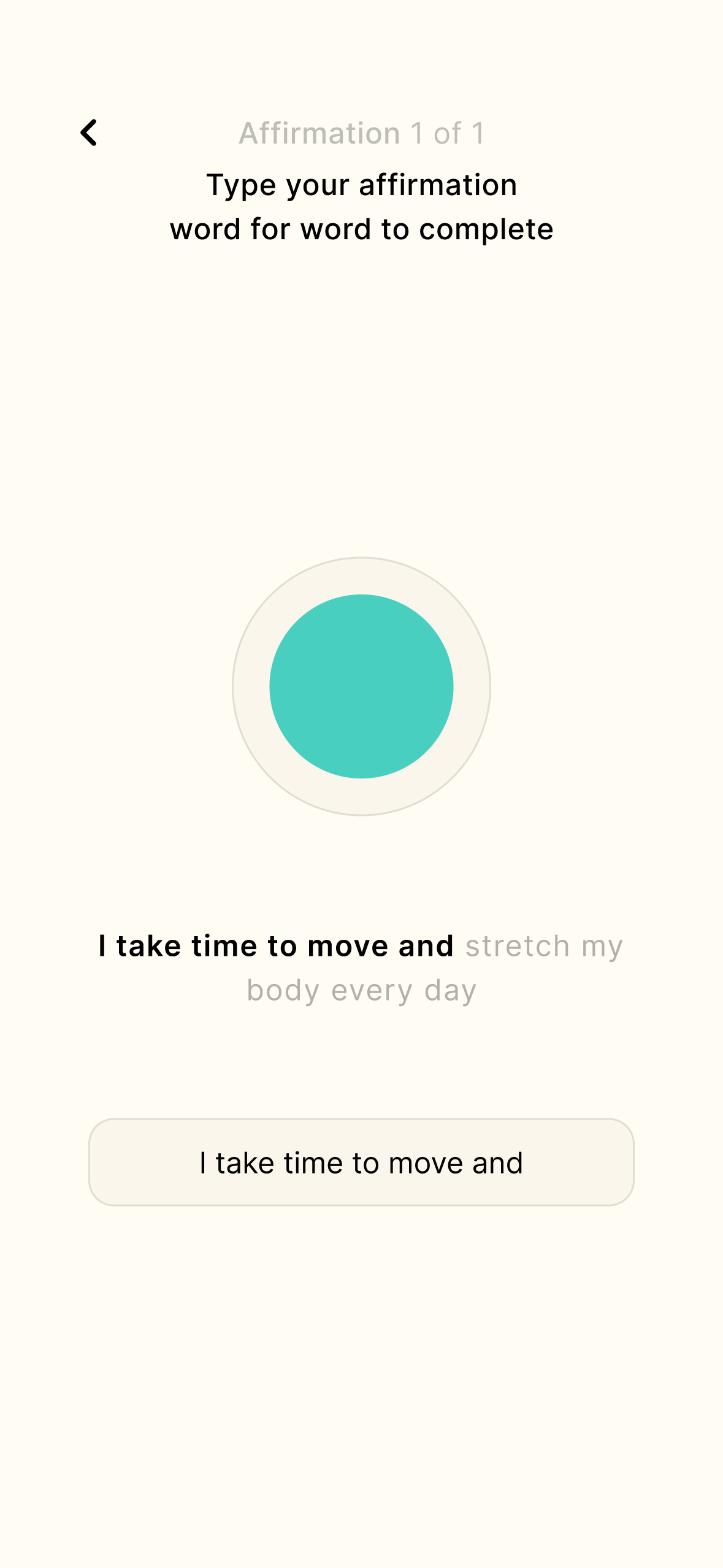
Typing: Users type each affirmation word for word.
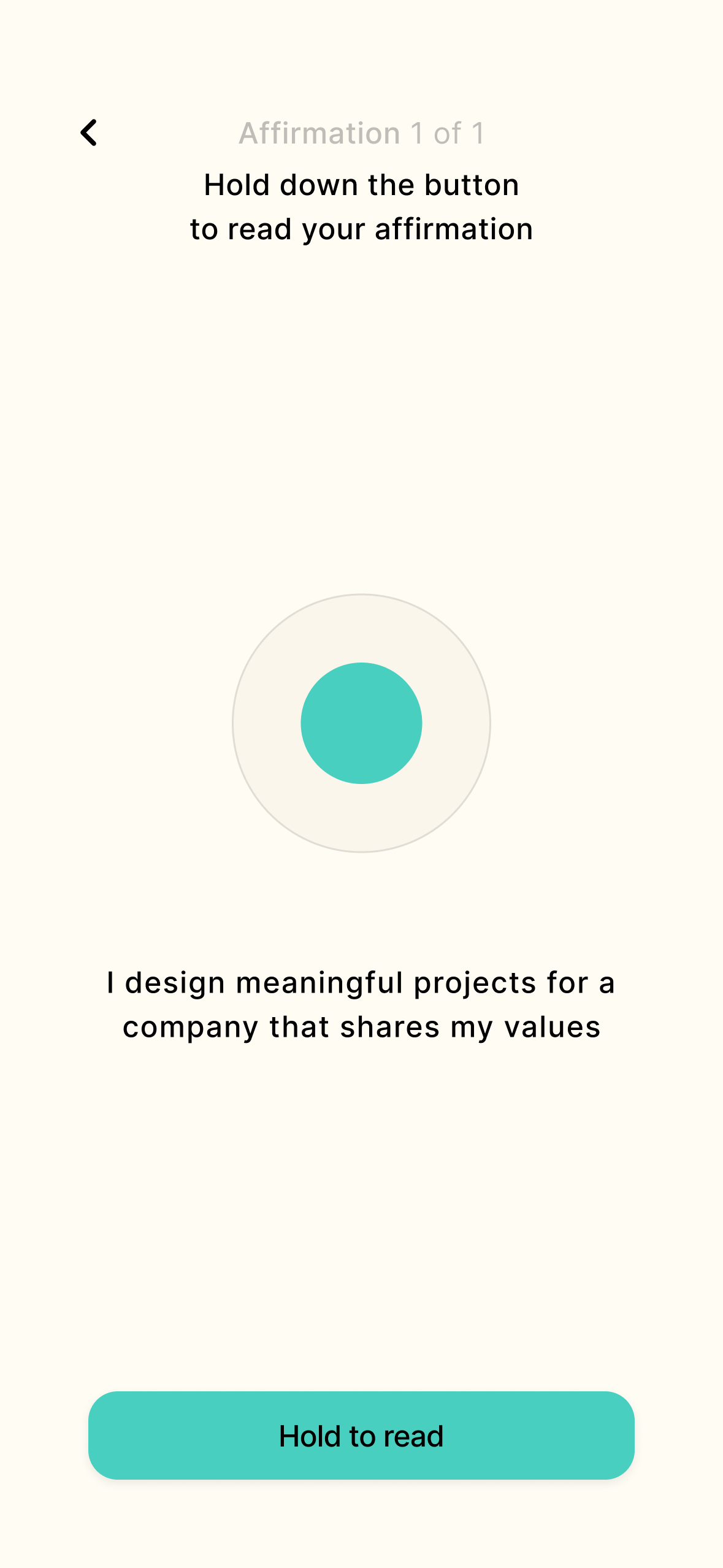
Reading: Users hold a button to view and read each affirmation.
Puzzle: Affirmations are shown as a set of randomized, single word buttons. Users select the words in the correct order to complete the practice.
prototyping
Prototyping with AI
Prototypes are tools for learning, not finished products.
Prototyping with AI can feel effortless, making it tempting to chase polish and perfect interactivity — but that's not the goal yet.
Before touching any tools, I take time to ground myself in what I am trying to learn.
What assumptions am I trying to validate?
What level of fidelity do I need for this prototype?
Who do I need to test this with, and how will I collect feedback?
- establish research goals
- Which interaction methods feel meaningful?
- Do users feel more clarity and focus after practicing their affirmations?
- Does the practice feel manageable for daily use?
- Does tracking user streak and session count motivate users?
- Does having the ability to mark a goal as realized motivate users?
- definE design intent with claude
With my research goals in mind, I shared a brief description of my concept with Claude, prompting it to ask me rounds of clarifying questions to force clarity of my ideas––creating a brief PRD and clear prompts for each of the core features, flows, and interactions.

Learnings

- creatE visuals in figma
Next, I built low fidelity wireframes in Figma — giving AI a visual reference for spacing, hierarchy, and structure that would have taken paragraphs to describe in words alone.
Learnings
- build prototype with figma make
I then fed both written and visual prompts into Figma Make, screen by screen. Minimal revisions were needed to ensure all interactions and flows felt ready for testing.
learNings
LOw FIdelity: user testing
V1: Testing interaction methods
With a low-fi prototype ready for testing in just a few hours, that same day, I recruited 10 test users (ages 20-69) throughout my office and Instagram, gathering feedback via a short Google Form survey.
Typing
Reading
Puzzle
Dashboard
Pros:
- 100% of users found typing and reading their affirmations felt enjoyable and meaningful––noting that typing was particularly fun.
- 100% of users felt more focused and clear afterwards.
- Users expressed a desire for push notifications, more data and engaging UI.
Cons:
- The puzzle interaction failed—users felt they were solving a game, not connecting with an intention.
- Users were confused by the dashboard, unclear on the meaning of ‘current streak’, ‘total sessions’, and ‘repeat practice’.
Takeaways:
- Add clarity to the onboarding flow about how the app works.
- Remove the puzzle interaction.
- Add hierarchy to the dashboard, highlighting the practice buttons, and provide clearer data visualization.
mid fidelity: user testing
V2: Onboarding & dashboard redesign
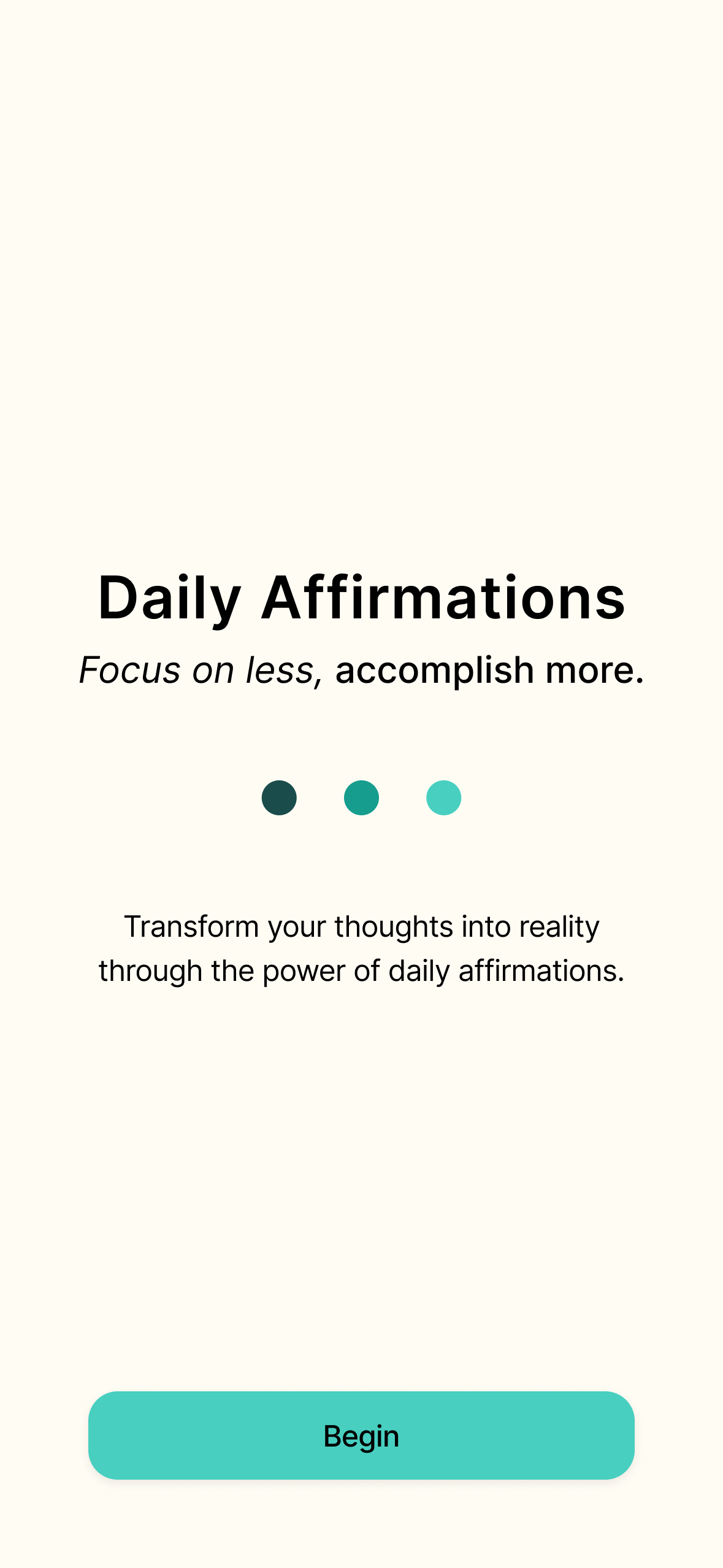
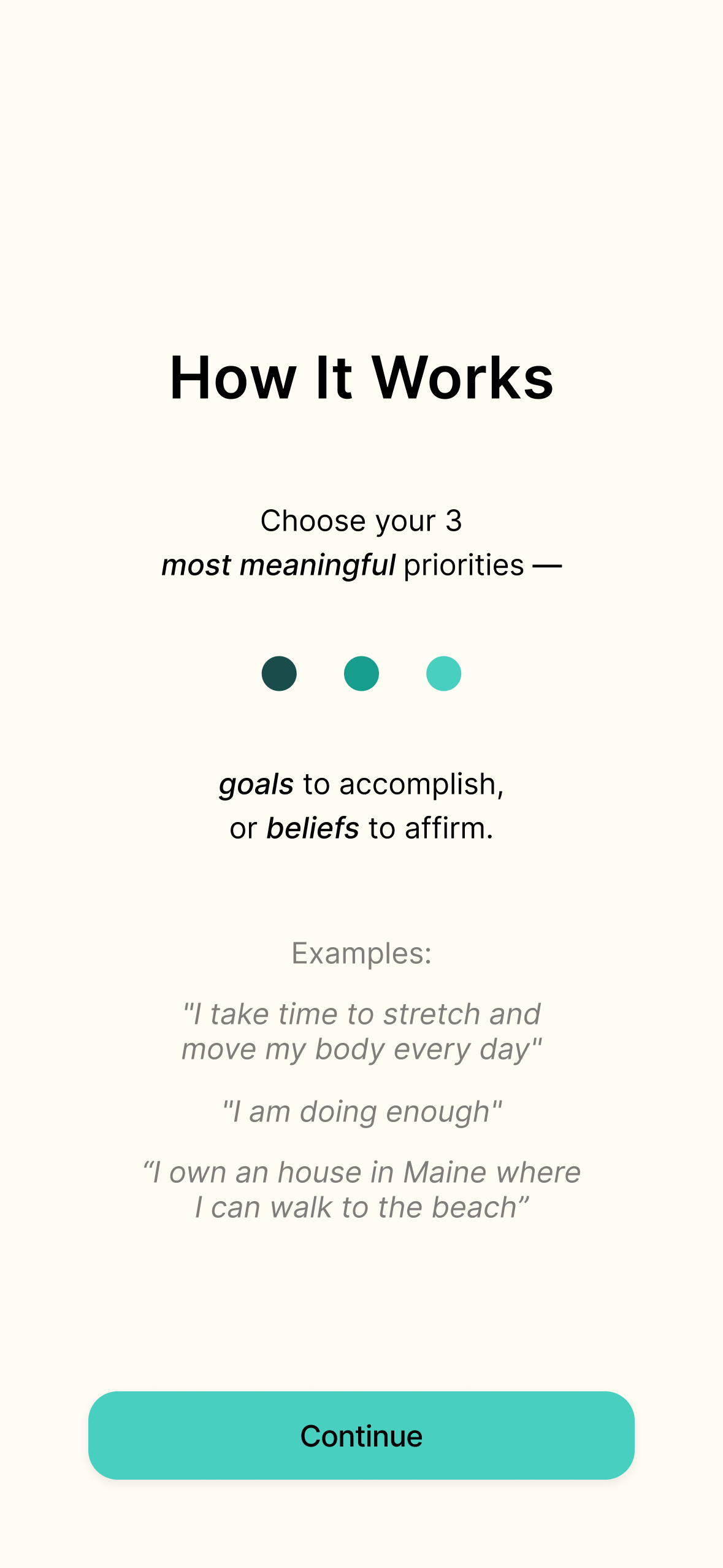
Low-fi testing validated the affirmation interactions, but the dashboard needed clearer structure and onboarding failed to provide users with enough context.
Mid-fi focused on two fixes:
- Expanded onboarding flow showing how the app works before users first affirmation practice
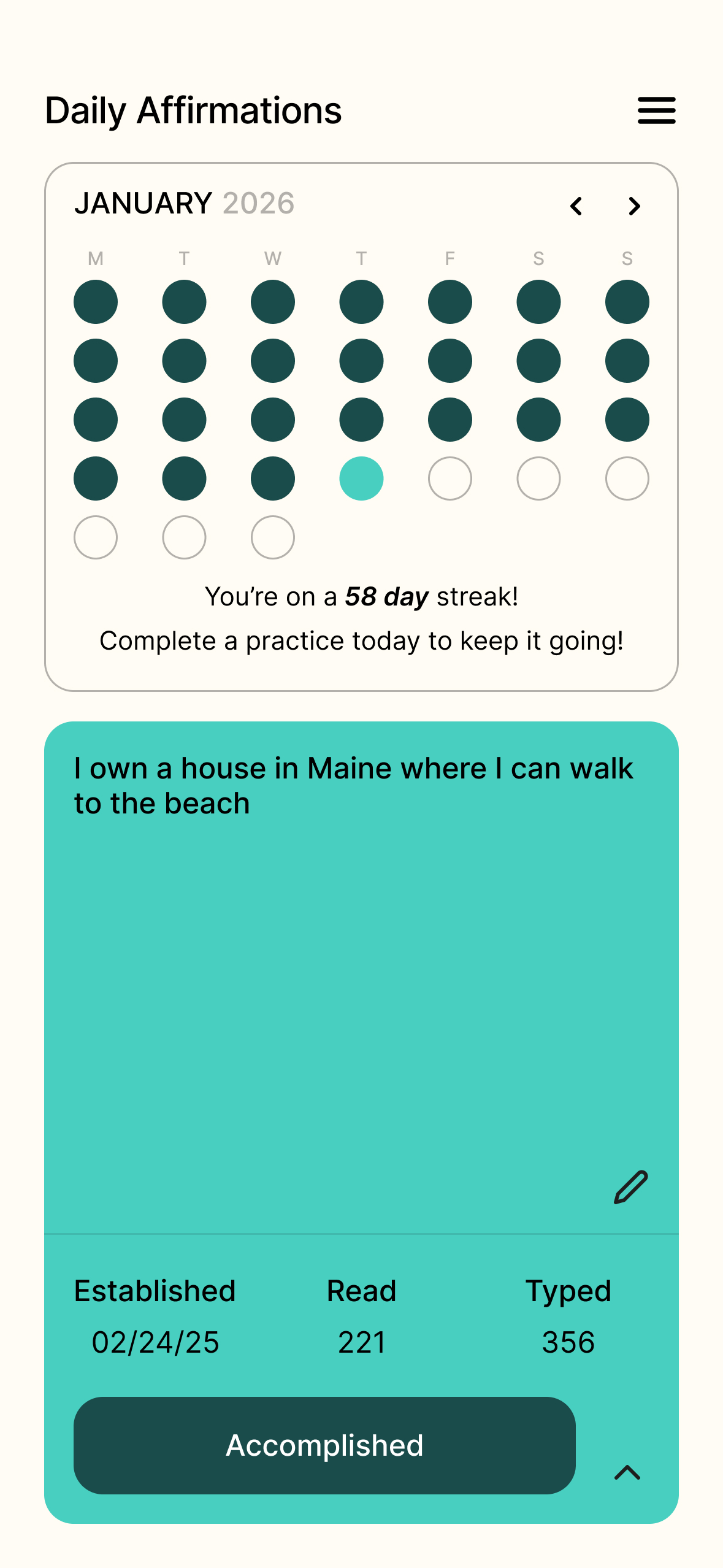
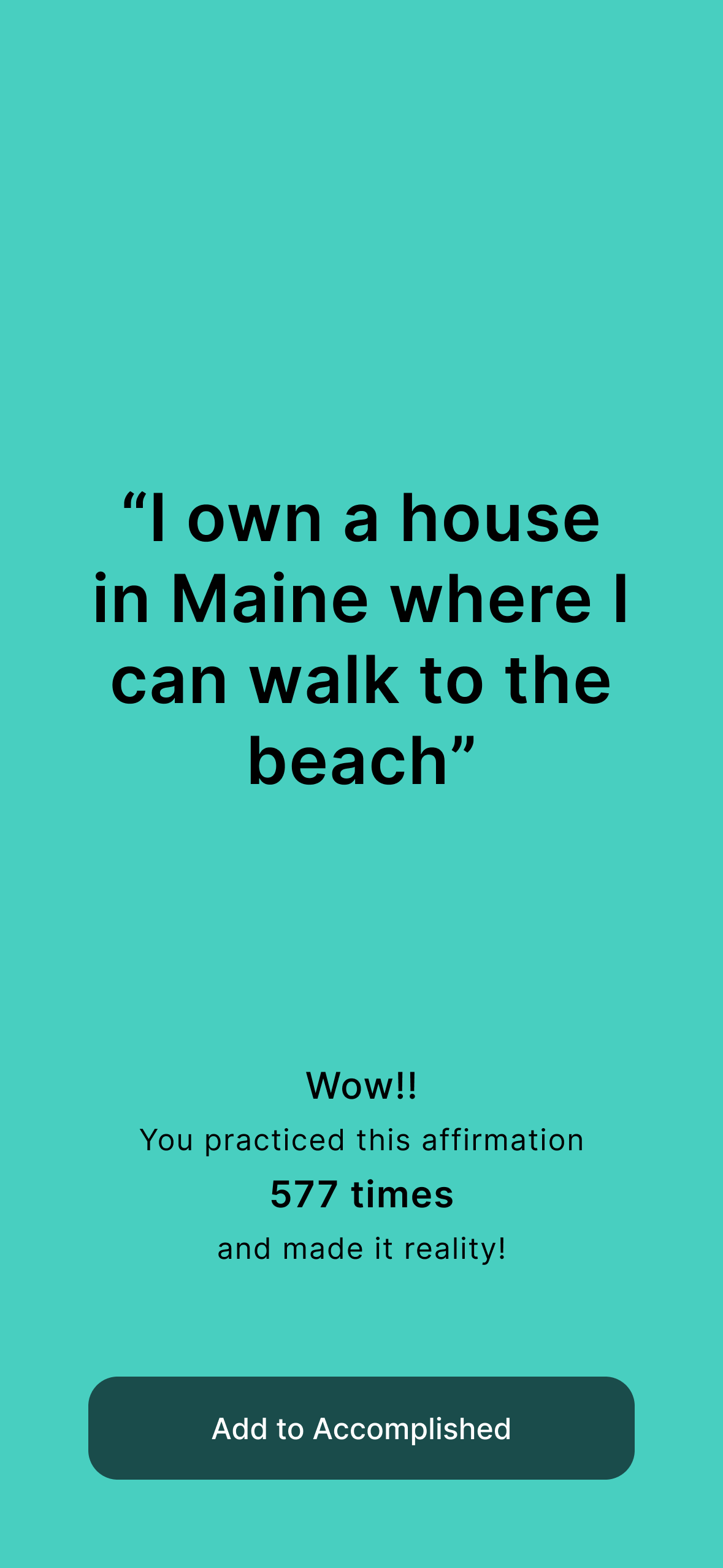
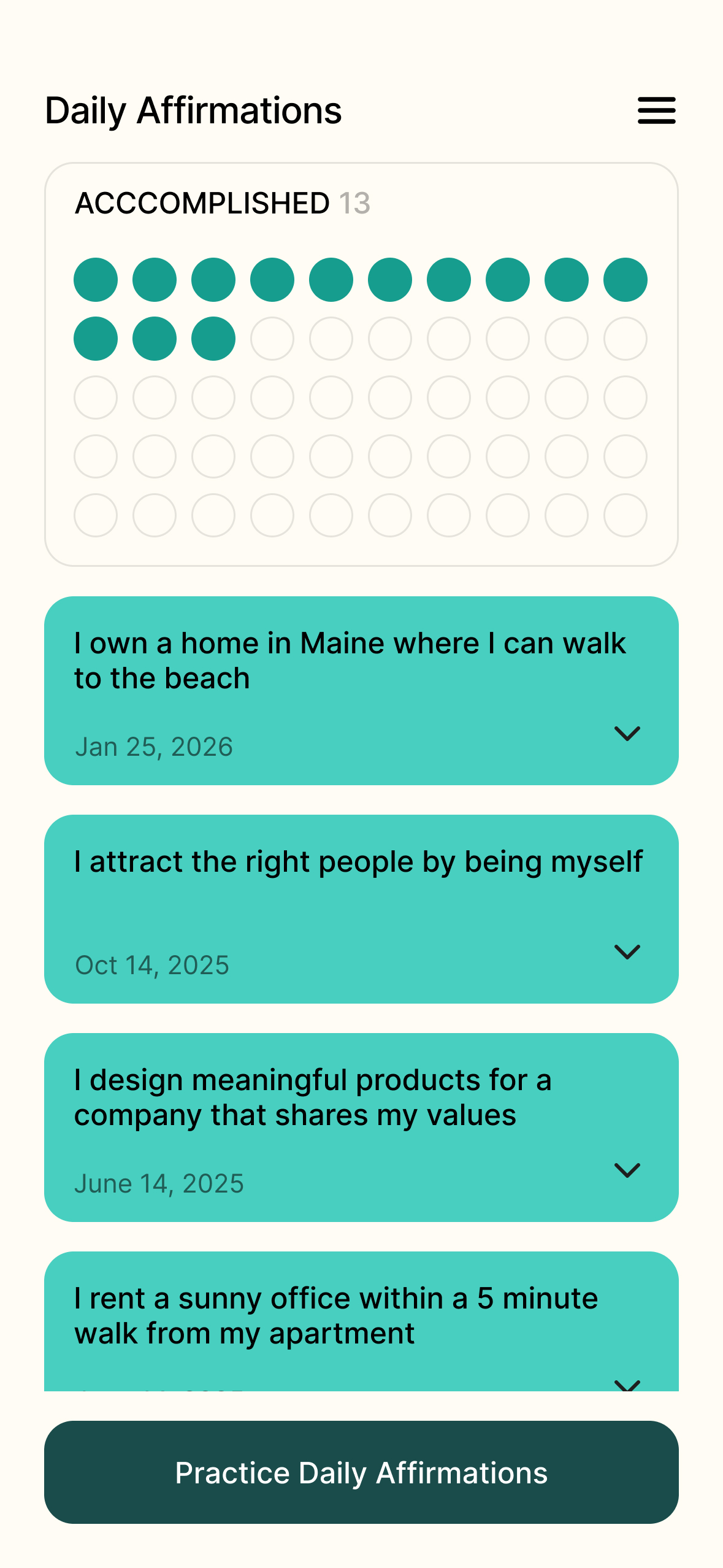
- Redesigned dashboard with clearer hierarchy, prominent practice entry points, and more intuitive data visualization
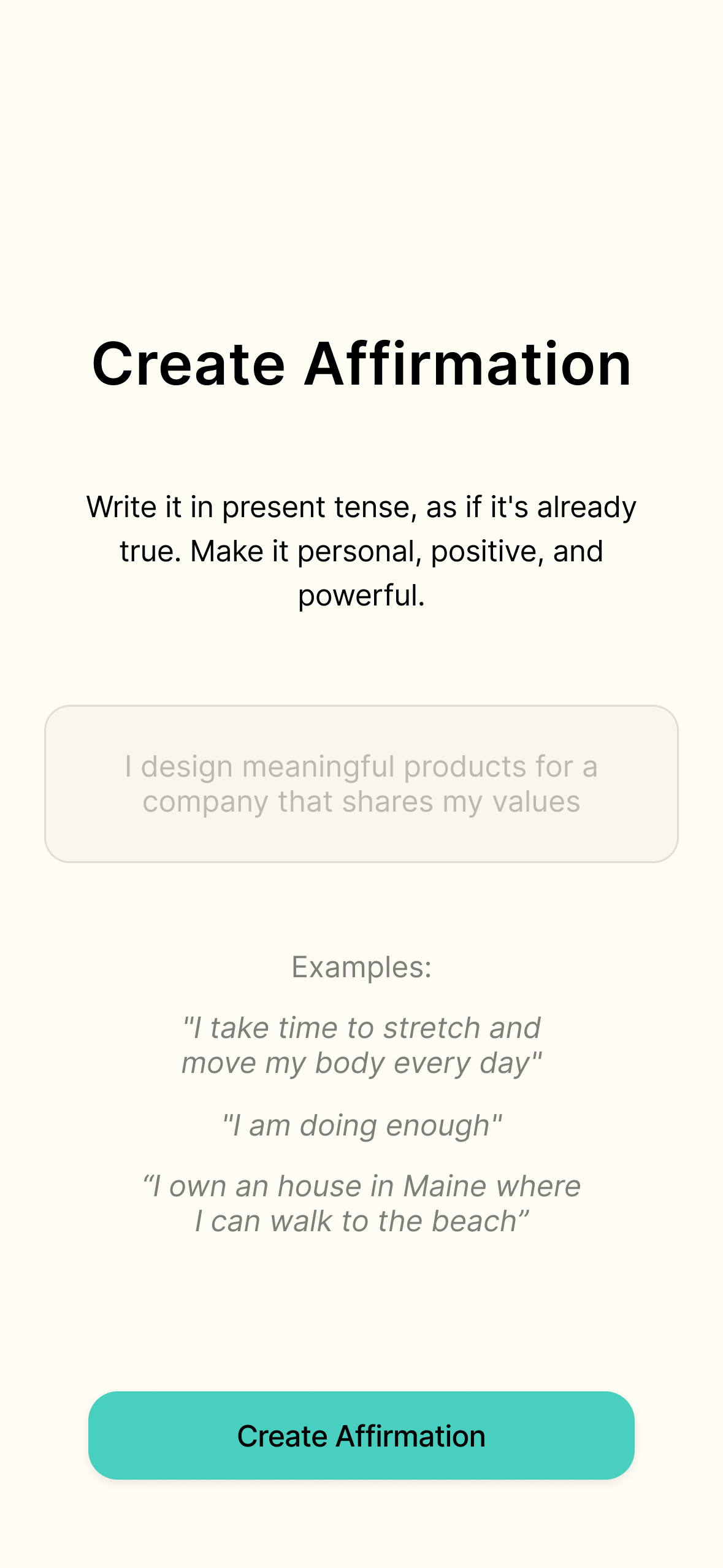
Onboarding
Dashboard
Pros:
- The dashboard changes landed — users understood their streaks and session data without needing explanation.
- The onboarding flow resonated strongly, with users reporting a greater sense of motivation and readiness going into their first session.
Cons:
- Users wanted more guidance on what kinds of affirmations to write — many weren't sure where to start.
Takeaways:
- Personalize onboarding to prompt user affirmations.
- Introduce a real backend to enable agile design and development, and design for push notifications to support the daily habit.
high fidelitiy
V3: A real backend with personalized onboarding and future push notifications
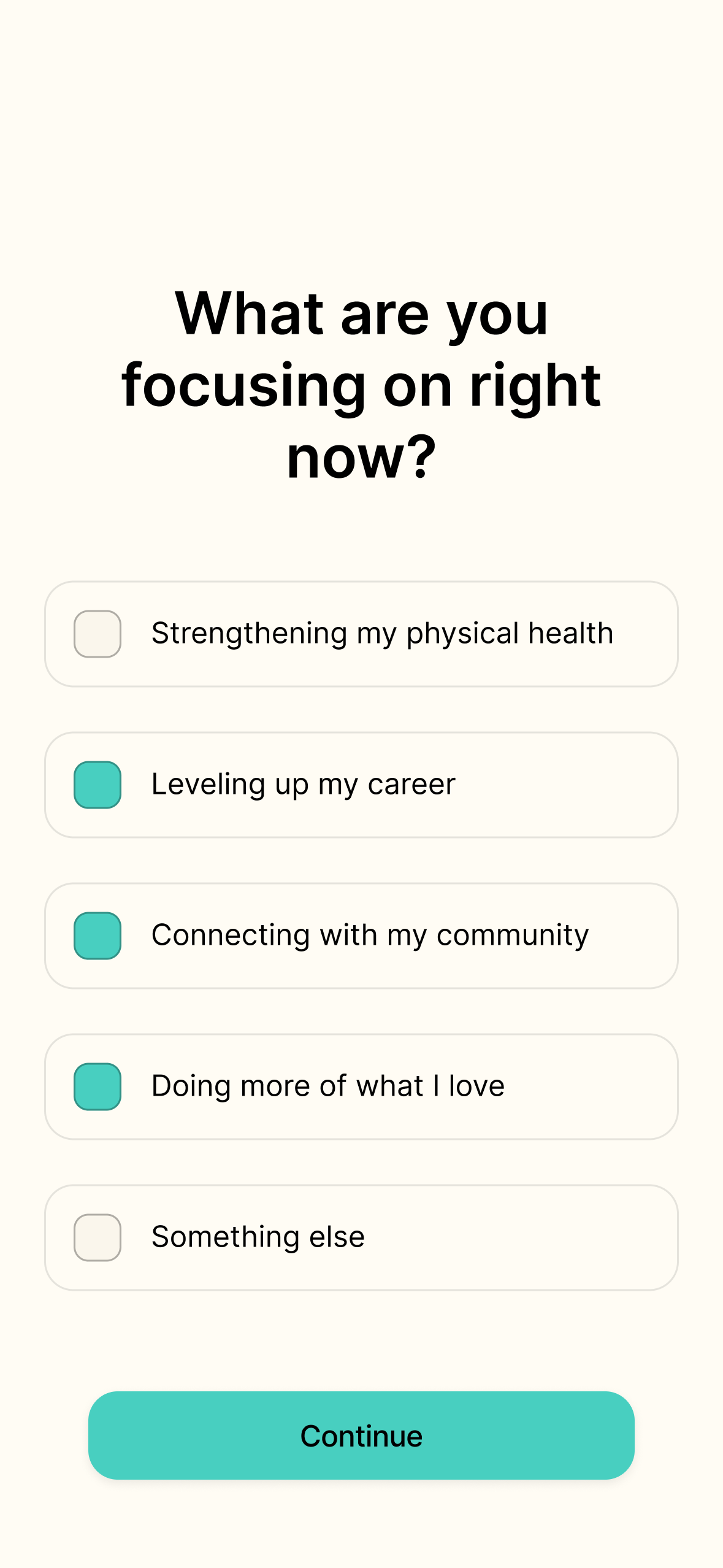
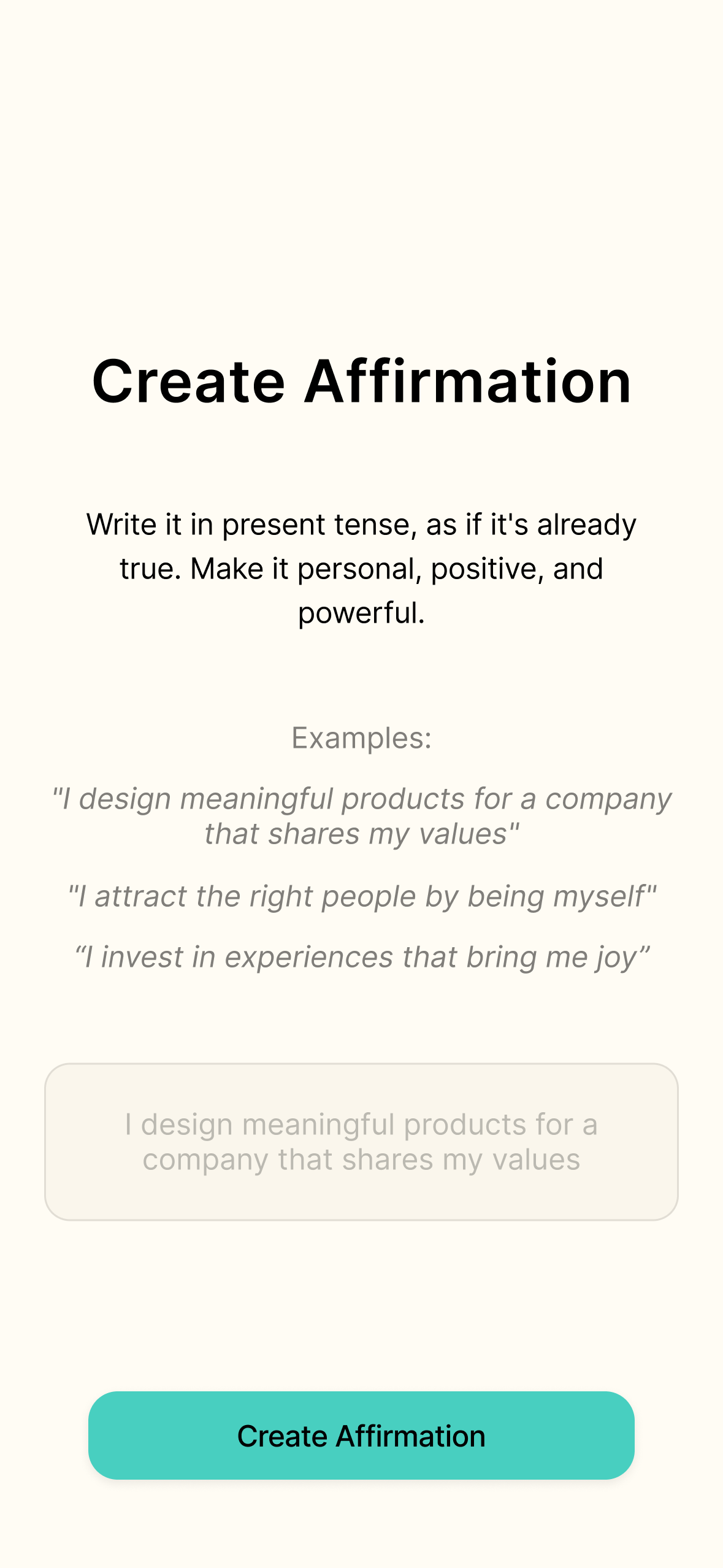
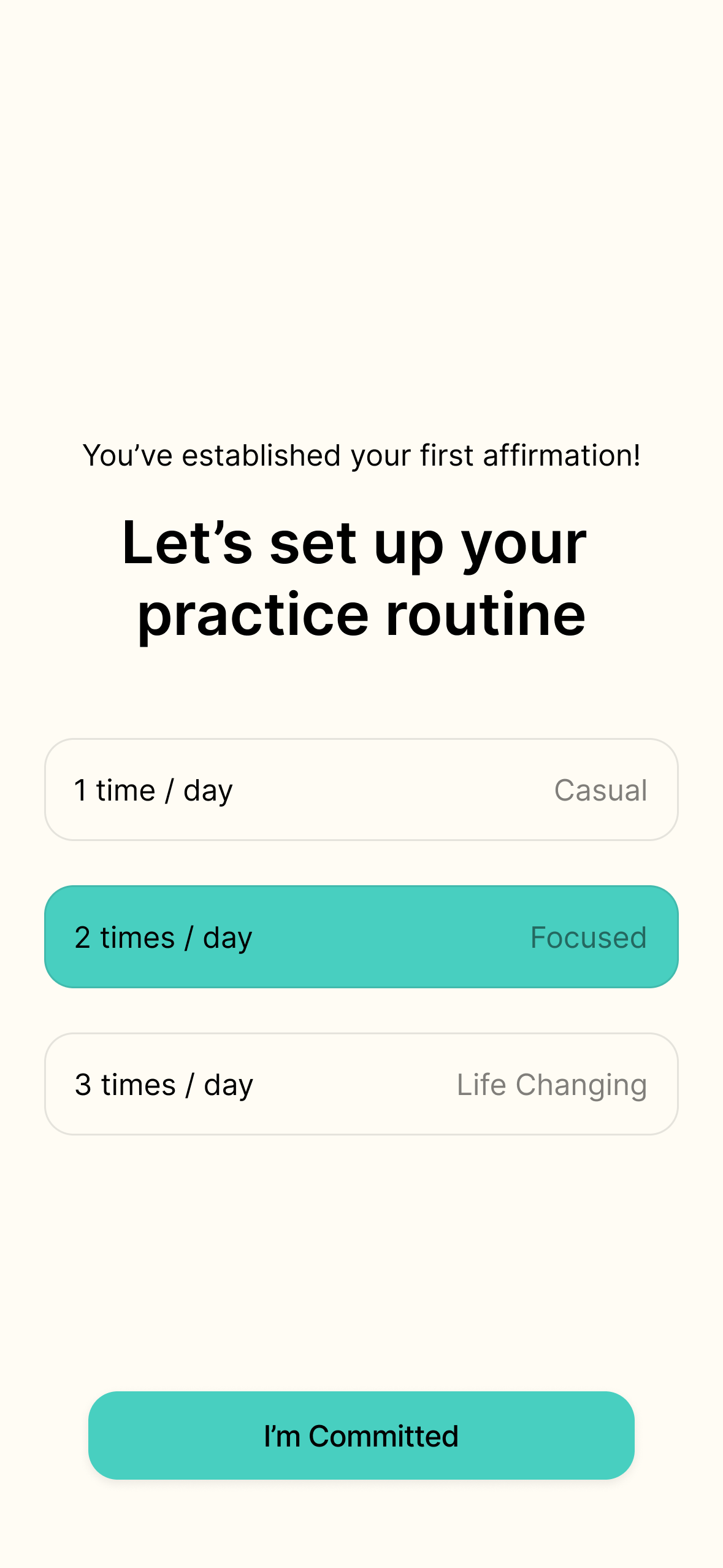
With the redesigned dashboard and expanded onboarding validated through the mid-fi testing, I expanded the prototype into a usable product by introducing a real backend—with Supabase handling persistent logins and cross-session data—giving me the infrastructure to study real behavior beyond a single session.
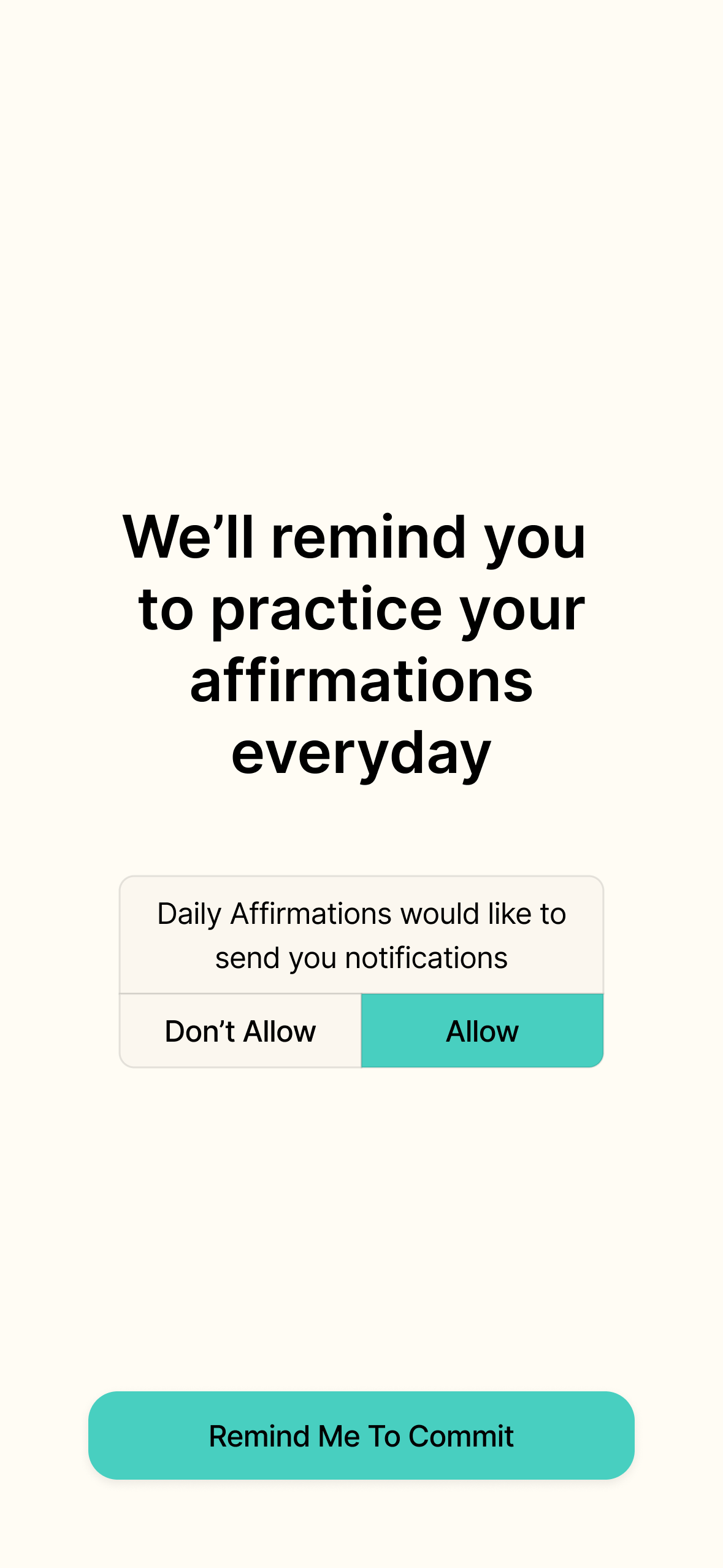
Personalized onboarding helps users identify meaningful affirmations, and designs for future push notifications set users up to stay committed to, and actualize their goals.
Personalized onboarding
Push notifications
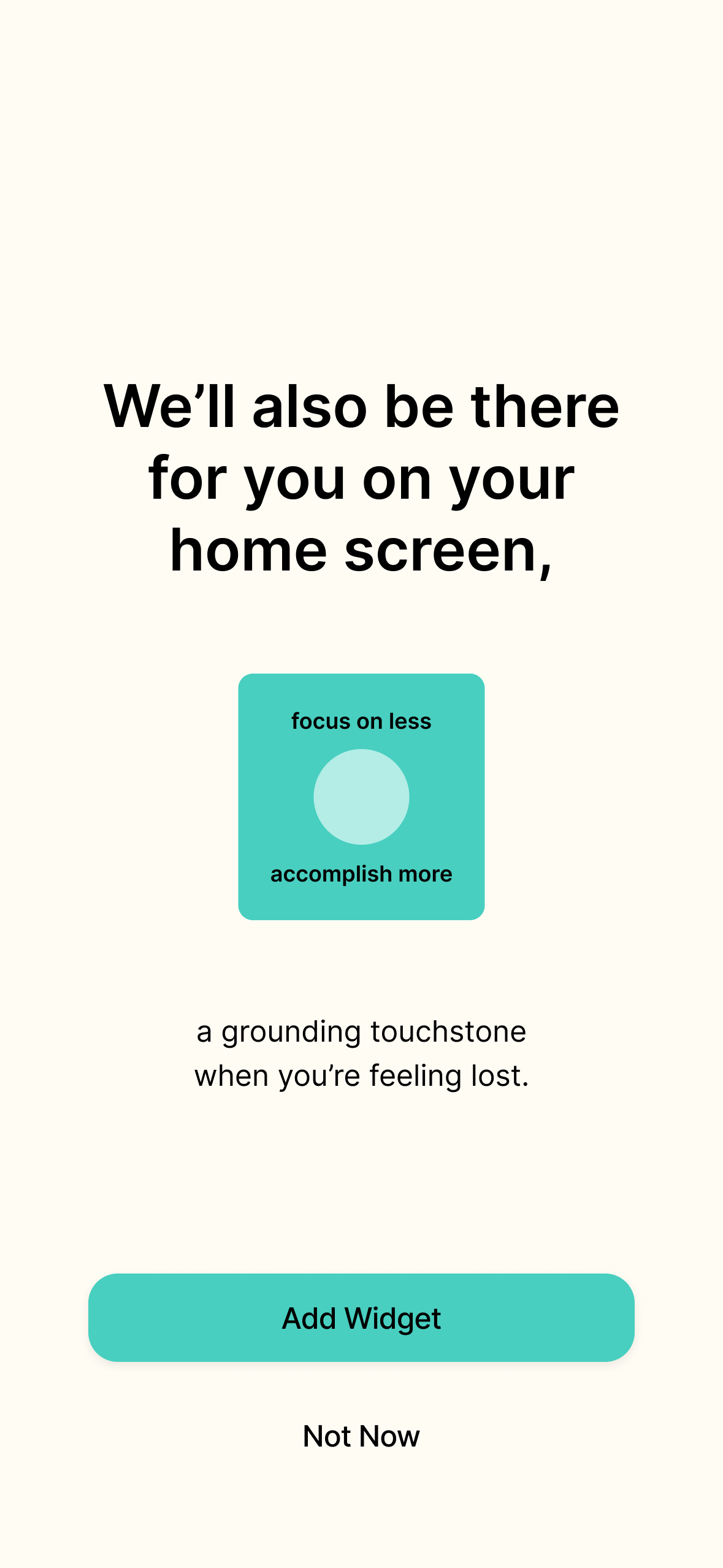
Takeaways: Users have since reported that Daily Affirmations helps them begin each day with a clearer sense of direction—and serves as a grounding touchstone throughout the day when they feel scattered or off-course.
The Solution
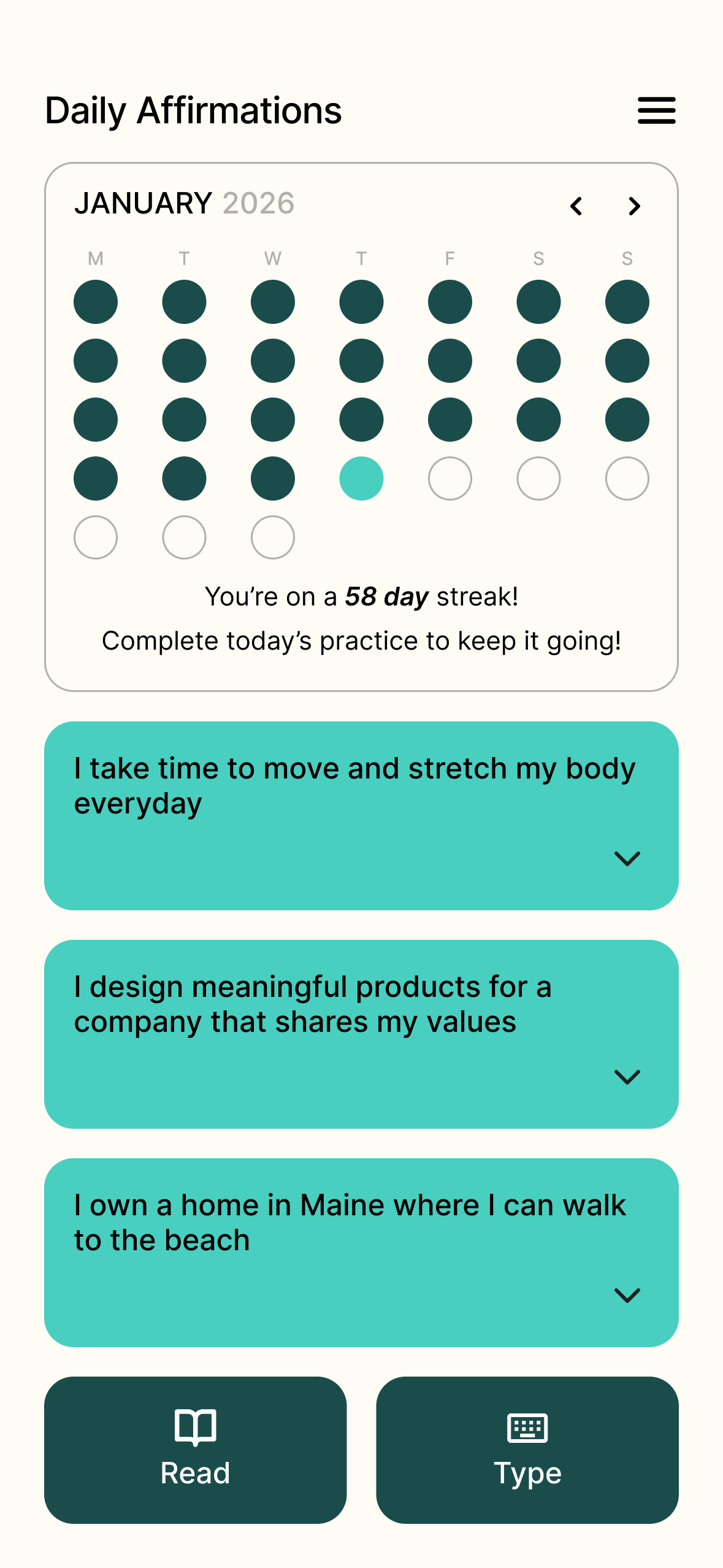
Daily Affirmations: Focus on less, accomplish more.
Users define a small set of goals and beliefs that anchor their lives, then return to them throughout the day to remember what they'd chosen to prioritize, and keep accountable to those decisions—a defense against the slow drift that happens when everyday noise quietly steers us away from ourselves.
Try Daily Affirmations for yourself!
Daily Affirmations
Focus on less, accomplish more.
SKILLS
AI Workflow, Wireframing, Prototyping, User Testing, Analysis, Full-Stack Thinking
TOOLS
Claude, Figma, FigmaMake, Supabase, Surveys
TIMELINE
1 week
TEAM
Solo
opportunity space
It’s 2026 and nearly everyone has access to an endless stream of ideas and opportunities constantly competing for their attention.
Morning Pages––a daily "brain dump" journaling practice meant to reduce stress, improve focus, and overcome creative blocks––helped me start each day with intention and provided a window to connect with my thoughts, but the commitment of writing three-pages daily proved unsustainable.
When I revisited an old entry a month later, I discovered goals I'd completely forgotten but still deeply cared about, buried under everyday noise.
the challenge
The challenge is choosing which ideas & opportunities deserve our sustained focus, and protecting that commitment when new, equally compelling ones emerge.
I needed a quick way to anchor myself in what I really cared to be putting my energy and focus towards––ensuring my efforts day to day stay in alignment with the life I want to be living.
inspiration
Leveraging the psychology of affirmations
Affirmation
A positive statement you repeat regularly to yourself – aloud or silently – to build confidence, challenge negative thoughts, and focus on what you want to achieve.
“I make time for the
things and people that nourish me.”
“I’m building a life
I’m obsessed with.”
“I release perfection and
embrace progress.”
“I invest in myself
because I am worth it.”
“I attract the right people by being myself.”
“I choose curiosity
over criticism.”
How might we use affirmations to help users stay committed to, and ultimately actualize, their most meaningful values and desires?
concept
Users define a small set of affirmations — goals or beliefs they want to achieve or embody — then actively engage with them word for word each day, until those affirmations become reality.
After several rounds of hand sketching possible ways users could practice their affirmations, I chose a user flow and three interactions to bring to life for testing:
Typing: Users type each affirmation word for word.
Reading: Users hold a button to view and read each affirmation.
Puzzle: Affirmations are shown as a set of randomized, single word buttons. Users select the words in the correct order to complete the practice.
prototyping
Prototyping with AI
Prototypes are tools for learning, not finished products.
Prototyping with AI can feel effortless, making it tempting to chase polish and perfect interactivity — but that's not the goal yet.
Before touching any tools, I take time to ground myself in what I am trying to learn.
What assumptions am I trying to validate?
What level of fidelity do I need for this prototype?
Who do I need to test this with, and how will I collect feedback?
- establish research goals
- Which interaction methods feel meaningful?
- Do users feel more clarity and focus after practicing their affirmations?
- Does the practice feel manageable for daily use?
- Does tracking user streak and session count motivate users?
- Does having the ability to mark a goal as realized motivate users?
- definE design intent with claude
With my research goals in mind, I shared a brief description of my concept with Claude, prompting it to ask me rounds of clarifying questions to force clarity of my ideas––creating a brief PRD and clear prompts for each of the core features, flows, and interactions.
Learnings
- creatE visuals in figma
Next, I built low fidelity wireframes in Figma — giving AI a visual reference for spacing, hierarchy, and structure that would have taken paragraphs to describe in words alone.
Learnings
- build prototype with figma make
I then fed both written and visual prompts into Figma Make, screen by screen. Minimal revisions were needed to ensure all interactions and flows felt ready for testing.
learNings
LOw FIdelity: user testing
V1: Testing interaction methods
With a low-fi prototype ready for testing in just a few hours, that same day, I recruited 10 test users (ages 20-69) throughout my office and Instagram, gathering feedback via a short Google Form survey.
Typing
Reading
Puzzle
Dashboard
Pros:
- 100% of users found typing and reading their affirmations felt enjoyable and meaningful––noting that typing was particularly fun.
- 100% of users felt more focused and clear afterwards.
- Users expressed a desire for push notifications, more data and engaging UI.
Cons:
- The puzzle interaction failed—users felt they were solving a game, not connecting with an intention.
- Users were confused by the dashboard, unclear on the meaning of ‘current streak’, ‘total sessions’, and ‘repeat practice’.
Takeaways:
- Add clarity to the onboarding flow about how the app works.
- Remove the puzzle interaction.
- Add hierarchy to the dashboard, highlighting the practice buttons, and provide clearer data visualization.
mid fidelity: user testing
V2: Onboarding & dashboard redesign
Low-fi testing validated the affirmation interactions, but the dashboard needed clearer structure and onboarding failed to provide users with enough context.
Mid-fi focused on two fixes:
- Expanded onboarding flow showing how the app works before users first affirmation practice
- Redesigned dashboard with clearer hierarchy, prominent practice entry points, and more intuitive data visualization
Onboarding
Dashboard
Pros:
- The dashboard changes landed — users understood their streaks and session data without needing explanation.
- The onboarding flow resonated strongly, with users reporting a greater sense of motivation and readiness going into their first session.
Cons:
- Users wanted more guidance on what kinds of affirmations to write — many weren't sure where to start.
Takeaways:
- Personalize onboarding to prompt user affirmations.
- Introduce a real backend to enable agile design and development, and design for push notifications to support the daily habit.
high fidelitiy
V3: A real backend with personalized onboarding and future push notifications
With the redesigned dashboard and expanded onboarding validated through the mid-fi testing, I expanded the prototype into a usable product by introducing a real backend—with Supabase handling persistent logins and cross-session data—giving me the infrastructure to study real behavior beyond a single session.
Personalized onboarding helps users identify meaningful affirmations, and designs for future push notifications set users up to stay committed to, and actualize their goals.
Personalized onboarding
Push notifications
Takeaways: Users have since reported that Daily Affirmations helps them begin each day with a clearer sense of direction—and serves as a grounding touchstone throughout the day when they feel scattered or off-course.
The Solution
Daily Affirmations: Focus on less, accomplish more.
Users define a small set of goals and beliefs that anchor their lives, then return to them throughout the day to remember what they'd chosen to prioritize, and keep accountable to those decisions—a defense against the slow drift that happens when everyday noise quietly steers us away from ourselves.
Try Daily Affirmations for yourself!
Daily Affirmations
Focus on less, accomplish more.
SKILLS
AI Workflow, Wireframing, Prototyping, User Testing, Analysis, Full-Stack Thinking
TOOLS
Claude, Figma, FigmaMake, Supabase, Surveys
TIMELINE
1 week
TEAM
Solo
opportunity space
It’s 2026 and nearly everyone has access to an endless stream of ideas and opportunities constantly competing for their attention.
Morning Pages––a daily "brain dump" journaling practice meant to reduce stress, improve focus, and overcome creative blocks––helped me start each day with intention and provided a window to connect with my thoughts, but the commitment of writing three-pages daily proved unsustainable.
When I revisited an old entry a month later, I discovered goals I'd completely forgotten but still deeply cared about, buried under everyday noise.
the challenge
The challenge is choosing which ideas & opportunities deserve our sustained focus, and protecting that commitment when new, equally compelling ones emerge.
I needed a quick way to anchor myself in what I really cared to be putting my energy and focus towards––ensuring my efforts day to day stay in alignment with the life I want to be living.
inspiration
Leveraging the psychology of affirmations
Affirmation
A positive statement you repeat regularly to yourself – aloud or silently – to build confidence, challenge negative thoughts, and focus on what you want to achieve.
“I make time for the
things and people that nourish me.”
“I’m building a life
I’m obsessed with.”
“I release perfection and
embrace progress.”
“I invest in myself
because I am worth it.”
“I attract the right people by being myself.”
“I choose curiosity
over criticism.”
How might we use affirmations to help users stay committed to, and ultimately actualize, their most meaningful values and desires?
concept
Users define a small set of affirmations — goals or beliefs they want to achieve or embody — then actively engage with them word for word each day, until those affirmations become reality.
After several rounds of hand sketching possible ways users could practice their affirmations, I chose a user flow and three interactions to bring to life for testing:
Typing: Users type each affirmation word for word.
Reading: Users hold a button to view and read each affirmation.
Puzzle: Affirmations are shown as a set of randomized, single word buttons. Users select the words in the correct order to complete the practice.
prototyping
Prototyping with AI
Prototypes are tools for learning, not finished products.
Prototyping with AI can feel effortless, making it tempting to chase polish and perfect interactivity — but that's not the goal yet.
Before touching any tools, I take time to ground myself in what I am trying to learn.
What assumptions am I trying to validate?
What level of fidelity do I need for this prototype?
Who do I need to test this with, and how will I collect feedback?
- establish research goals
- Which interaction methods feel meaningful?
- Do users feel more clarity and focus after practicing their affirmations?
- Does the practice feel manageable for daily use?
- Does tracking user streak and session count motivate users?
- Does having the ability to mark a goal as realized motivate users?
- definE design intent with claude
With my research goals in mind, I shared a brief description of my concept with Claude, prompting it to ask me rounds of clarifying questions to force clarity of my ideas––creating a brief PRD and clear prompts for each of the core features, flows, and interactions.
Learnings
- creatE visuals in figma
Next, I built low fidelity wireframes in Figma — giving AI a visual reference for spacing, hierarchy, and structure that would have taken paragraphs to describe in words alone.
Learnings
- build prototype with figma make
I then fed both written and visual prompts into Figma Make, screen by screen. Minimal revisions were needed to ensure all interactions and flows felt ready for testing.
learNings
LOw FIdelity: user testing
V1: Testing interaction methods
With a low-fi prototype ready for testing in just a few hours, that same day, I recruited 10 test users (ages 20-69) throughout my office and Instagram, gathering feedback via a short Google Form survey.
Typing
Reading
Puzzle
Dashboard
Pros:
- 100% of users found typing and reading their affirmations felt enjoyable and meaningful––noting that typing was particularly fun.
- 100% of users felt more focused and clear afterwards.
- Users expressed a desire for push notifications, more data and engaging UI.
Cons:
- The puzzle interaction failed—users felt they were solving a game, not connecting with an intention.
- Users were confused by the dashboard, unclear on the meaning of ‘current streak’, ‘total sessions’, and ‘repeat practice’.
Takeaways:
- Add clarity to the onboarding flow about how the app works.
- Remove the puzzle interaction.
- Add hierarchy to the dashboard, highlighting the practice buttons, and provide clearer data visualization.
mid fidelity: user testing
V2: Onboarding & dashboard redesign
Low-fi testing validated the affirmation interactions, but the dashboard needed clearer structure and onboarding failed to provide users with enough context.
Mid-fi focused on two fixes:
- Expanded onboarding flow showing how the app works before users first affirmation practice
- Redesigned dashboard with clearer hierarchy, prominent practice entry points, and more intuitive data visualization
Onboarding
Dashboard
Pros:
- The dashboard changes landed — users understood their streaks and session data without needing explanation.
- The onboarding flow resonated strongly, with users reporting a greater sense of motivation and readiness going into their first session.
Cons:
- Users wanted more guidance on what kinds of affirmations to write — many weren't sure where to start.
Takeaways:
- Personalize onboarding to prompt user affirmations.
- Introduce a real backend to enable agile design and development, and design for push notifications to support the daily habit.
high fidelitiy
V3: A real backend with personalized onboarding and future push notifications
With the redesigned dashboard and expanded onboarding validated through the mid-fi testing, I expanded the prototype into a usable product by introducing a real backend—with Supabase handling persistent logins and cross-session data—giving me the infrastructure to study real behavior beyond a single session.
Personalized onboarding helps users identify meaningful affirmations, and designs for future push notifications set users up to stay committed to, and actualize their goals.
Personalized onboarding
Push notifications
Takeaways: Users have since reported that Daily Affirmations helps them begin each day with a clearer sense of direction—and serves as a grounding touchstone throughout the day when they feel scattered or off-course.
The Solution
Daily Affirmations: Focus on less, accomplish more.
Users define a small set of goals and beliefs that anchor their lives, then return to them throughout the day to remember what they'd chosen to prioritize, and keep accountable to those decisions—a defense against the slow drift that happens when everyday noise quietly steers us away from ourselves.
Try Daily Affirmations for yourself!